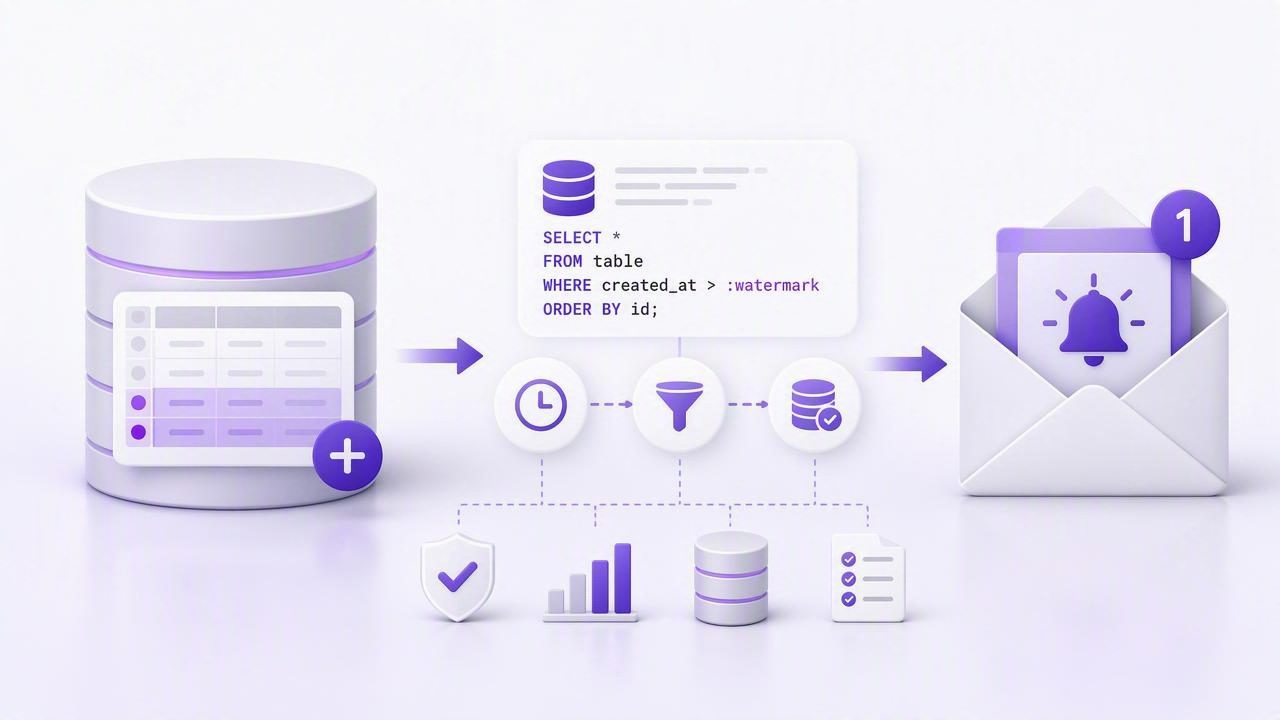
Getting email notifications for new rows inserted sounds simple until you hit real-world constraints: you don’t want to poll too aggressively, you can’t afford duplicates, you must keep queries read-only, and your approach needs to survive restarts, deploys, and clock drift.
This guide walks through reliable patterns to detect newly inserted rows in SQL databases (with brief notes for NoSQL) and send email alerts safely. The emphasis is on low-impact queries, idempotency, and operational correctness—the pieces that matter when you turn “notify me” into something production-grade.
What “new rows inserted” really means
Before writing a query, decide what qualifies as “new”:
- New since last check (polling): you run a query every N minutes and fetch rows created after a stored “watermark.”
- New in the last window (time-based): you fetch rows created in the last 5 minutes. This is simpler but can miss rows during delays or double-send on retries.
- New matching a condition: e.g., “new paid orders,” “new failed jobs,” or “new high-value transactions.”
Most teams want new since last successful check. That requires a durable watermark and a stable ordering column.
Four common detection patterns (and when to use them)
| Pattern | Best for | Pros | Cons |
|---|---|---|---|
| Auto-increment / sequence ID watermark | Tables with monotonic primary key (BIGINT) | Fast, index-friendly, avoids clock issues | Not always strictly gapless; sharding may break monotonicity |
Timestamp watermark (created_at) |
Event tables with reliable insert timestamps | Intuitive, works without numeric IDs | Clock drift, same-timestamp ties, backfills need care |
| Trigger-based outbox | When you can change schema | Very reliable, explicit “rows to notify” | Requires write permissions and deploy coordination |
| CDC / logical replication stream | Near-real-time pipelines | Low latency, scalable | More infrastructure, operational overhead |
For read-only monitoring (common in analytics and production safety), the first two patterns are the usual starting point.
The watermark approach (recommended)
The watermark pattern has two moving parts:
- A cursor value that represents the last processed row (e.g., last seen
idor last seencreated_at). - A query that returns rows strictly after that cursor, ordered deterministically.
Done well, it prevents missing rows and limits duplicates even when your check schedule slips.
Option A: Numeric ID watermark (Postgres / MySQL)
If your table has a monotonic primary key like BIGSERIAL (Postgres) or AUTO_INCREMENT (MySQL), use it as the cursor. Example for a table orders(id, created_at, customer_email, total_cents):
-- Input: :last_id is the watermark from the previous successful run
SELECT id, created_at, customer_email, total_cents
FROM orders
WHERE id > :last_id
ORDER BY id ASC
LIMIT 500; -- batch to protect load
After sending emails for this batch, advance the watermark to the max id you processed.
Why it scales: this query is typically index-only on the primary key, and ordering by id aligns with the index.
Option B: Timestamp + tiebreaker watermark
If you don’t have a clean monotonic ID (or you’re querying a view), timestamps can work—as long as you handle ties. Use a composite cursor: (created_at, id) where id is a stable unique tiebreaker.
-- Input: :last_created_at, :last_id
SELECT id, created_at, customer_email, total_cents
FROM orders
WHERE (created_at, id) > (:last_created_at, :last_id)
ORDER BY created_at ASC, id ASC
LIMIT 500;
In Postgres, row-value comparison works as shown. In MySQL, you can emulate it:
SELECT id, created_at, customer_email, total_cents
FROM orders
WHERE created_at > :last_created_at
   OR (created_at = :last_created_at AND id > :last_id)
ORDER BY created_at ASC, id ASC
LIMIT 500;
Indexing tip: add a composite index on (created_at, id) to avoid scans.
Avoiding duplicates and missed rows
Email is unforgiving: once you send, you can’t “unsend.” Reliability is mostly about edge cases.
1) Use “greater than,” not “greater than or equal”
Your query should be > the last cursor, not >=. Otherwise, re-runs resend the last row.
2) Batch and checkpoint carefully
For large bursts, process in batches and only advance the watermark after each batch is successfully emailed. A safe loop is:
- Fetch up to 500 rows after watermark
- Send emails for that batch
- Store new watermark = last row of batch
- Repeat until no rows
3) Protect against backfills
If someone backfills old data (inserting rows with old created_at), timestamp-only approaches can miss them. Numeric ID watermarks usually still catch them. If you must use timestamps, consider:
- Alert based on inserted ID rather than event time
- Or use an explicit
ingested_atcolumn set at insert time
4) Add a dedupe key for idempotency
Even with good cursoring, retries happen (network failures, SMTP timeouts). Track what you sent using a dedupe key such as orders:id. If you can’t write to production DB, store it in your alerting system’s state store.
Rule of thumb: your “send email” step should be safe to retry without generating multiple emails for the same row.
Choosing what to email: one message per row vs digest
“Email notifications for new rows inserted” can mean very different experiences:
- One email per row: best for low-volume, high-importance inserts (e.g., new enterprise signup).
- Digest email: best for medium/high volume (e.g., new error logs, new orders).
A common compromise is: send individual emails for rows above a threshold (e.g., total_cents > 100000) and digest the rest.
Example: query for “high-value” inserts only
SELECT id, created_at, customer_email, total_cents
FROM orders
WHERE id > :last_id
  AND total_cents >= 100000
ORDER BY id ASC
LIMIT 200;
Minimal email content that works operationally
For alerts, the email should answer: What happened? How urgent is it? Where do I click?
Subject: New order inserted: #{{id}} ({{total}})

A new row was inserted into orders.

id: {{id}}
created_at: {{created_at}}
customer_email: {{customer_email}}
total_cents: {{total_cents}}

View in admin: https://admin.example.com/orders/{{id}}
Runbook: https://wiki.example.com/runbooks/orders-alerts
Tip: Include stable identifiers (id) rather than raw JSON blobs. It keeps messages short and searchable.
Performance and safety checklist (read-only friendly)
- Use indexes aligned with the cursor: PK for
idwatermark, or composite(created_at, id)for timestamp watermark. - Limit every query to protect the database during spikes.
- Prefer a read replica when available; alerting should not contend with writes.
- Keep queries deterministic (
ORDER BYmatching the cursor) to avoid skipping rows across pages. - Use least privilege: read-only credentials; no
UPDATE/INSERTrequired for polling-based alerts. - Encrypt in transit: TLS to the database and to your email provider.
What about MongoDB (NoSQL) inserts?
For MongoDB, a common pattern is to poll by an increasing field such as _id (ObjectId is roughly time-ordered) or an explicit createdAt. For example, using ObjectId as a cursor:
// Pseudocode
db.orders.find({ _id: { $gt: lastId } })
         .sort({ _id: 1 })
         .limit(500)
As with SQL, store the last processed _id only after successful notifications.
Common pitfalls (and fixes)
Polling window gaps
If you query “last 5 minutes” and your job pauses for 10 minutes, you miss rows. Fix: use a stored watermark, not a fixed time window.
Clock drift and time zones
Timestamps from app servers can drift. Fix: use database-generated timestamps (e.g., DEFAULT now()) or numeric IDs. Always store cursors in UTC.
Hot partitions / big scans
Alerts that scan large tables can hurt performance. Fix: ensure the cursor column is indexed and your predicate is sargable (no wrapping columns in functions).
Email rate limits
Providers throttle. Fix: batch into digests, add backoff, and cap per-run sends with a clear “truncated” note in the email.
Putting it together: a practical run sequence
- Read stored watermark (e.g., last processed
id). - Run a limited, ordered query for rows where
id > watermark. - Transform rows into either individual messages or a digest.
- Send emails (with retry + dedupe key).
- Persist new watermark only after successful send.
- Repeat until no new rows or you reach a max runtime.
This structure is simple, auditable, and resilient under failures.
When you want fewer moving parts
If you’d rather not build and host alerting logic, there are tools that run read-only queries on a schedule and route results to notifications. For example, Query Alert takes SQL/NoSQL queries and turns them into smart alerts with push and email, while keeping connections encrypted and queries read-only.